
If static websites caught your attention, you might also be wondering:
“But how will forms work?!”
And you’re right to wonder.
Static websites are… static. They don’t usually process forms the same way dynamic websites do.
BUT…
Thanks to the modern web, and a whole world of tools built for this exact job, forms aren’t a problem for static sites anymore.
Here’s a confession: my own website doesn’t have a contact form. When it did, the only one filling it in was spam. So now I just share my email address and my social links. People who want to reach me still do, and my inbox stays clean.
The forms I do use are for signing up to my newsletter and joining waitlists. They’re small, and they send their details straight to another service through what’s called an API (a way for one website to hand information to another).
Here’s more about how to handle forms on a static website:
Why forms feel tricky on a static site
A static site is a set of ready-made pages. That’s what makes it fast, cheap and hard to break. But when someone fills in a form and presses Send, something has to receive that message and do something with it, like email it to you.
On WordPress, that something was usually a plugin running on your server. On a static site, there’s no server of your own. So the job goes somewhere else.
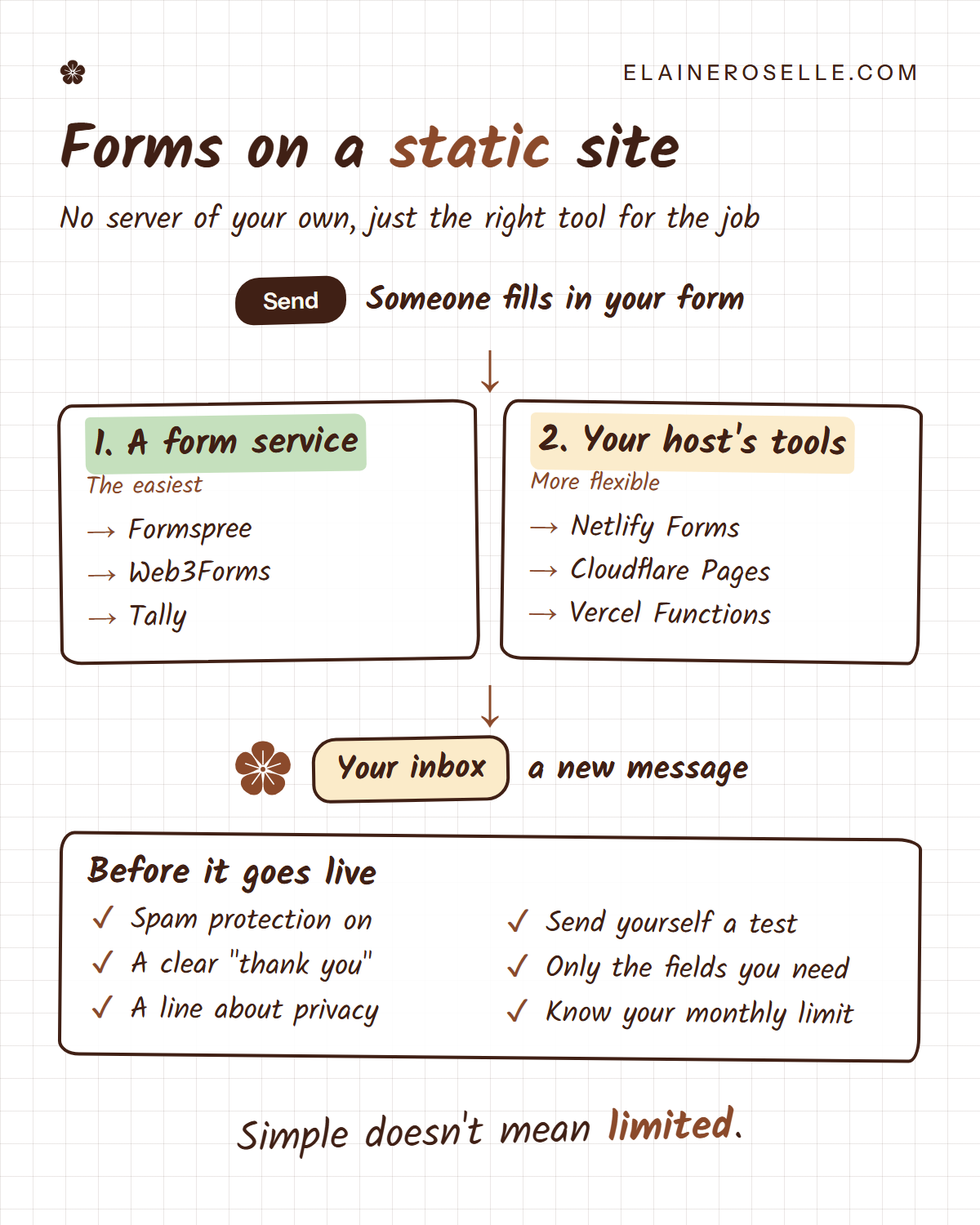
Two options for adding forms on a static website
Option 1: A form service (the easiest)
A form service is a small online tool that receives form messages for you. You build the form on your page as normal, point it at the service, and the service emails each message to you (and usually keeps a copy you can look at later).
That’s it. No server, no database, nothing to update.
Most form services have a free plan for a modest number of messages each month, with paid plans if you need more. For most small business contact forms, the free plan is plenty, but check the limits before you rely on one.
A few to look at:
- Formspree: point your form at it and messages land in your inbox. Popular and well documented.
- Web3Forms: very simple to set up; you just add a key to your form.
- Tally: build the whole form in their editor, then embed it on your page. Great if you’d rather not touch any code.
Static websites are... static.
Option 2: Your host’s own tools
Some static hosts can run a tiny piece of code when a form is sent, so you can handle messages without a separate service. It’s more flexible, but it’s a step closer to “building a backend”, so I’d only reach for it if a form service can’t do what you need.
What that looks like on the popular hosts:
- Netlify Forms: the exception to the rule. Netlify spots the form on your page and collects messages for you, with no code to write.
- Cloudflare Pages Functions: small bits of code that run when your form is sent. This is what my own site runs on.
- Vercel Functions: the same idea, if your site is hosted on Vercel.
What I do on my own site
I’ll be honest: my own site is a bit of a special case. My newsletter and waitlist forms send their messages to the members portal I built, because I already had one for my shop and courses.
When you sign up, the form checks you’re a real person with Cloudflare Turnstile, then sends your name and email to my members portal. The portal adds you to my email list. My website never stores your details itself; it just passes them along.
Most small businesses don’t need that. If you just want people to get in touch, a form service is simpler, and it’s what I’d recommend first.
The checks I never skip
Whichever way you go, do these before your form goes live:
- Turn on spam protection. Without it, you’ll get junk messages within days. Most form services include it; I use Cloudflare Turnstile on my own forms, which checks for bots without making people solve puzzles.
- Send yourself a test. Fill in the form on your live site and make sure the email actually arrives (and not in your spam folder).
- Show a clear “thank you”. After someone presses Send, tell them it worked and what happens next.
- Ask only for what you need. Name, email and message are usually enough. Every extra field is a reason to give up.
- Mention privacy. A line saying how you’ll use their details builds trust, and in many places it’s expected.
- Check the limits. Know how many messages your plan allows each month, so nothing gets quietly dropped.
What about bookings and newsletters?
These are usually best handled by tools built for the job. A booking tool for appointments and an email newsletter service for sign-ups both give you a form or a widget to place on your page. Your static site just shows it.
You're just letting dedicated tools do the parts they're good at.
Simple doesn’t mean limited
A static website can still say “get in touch”, take bookings and grow your email list. You’re just letting dedicated tools do the parts they’re good at, instead of keeping a server running for them.
If you’re planning a simpler website, my free Website Prompt Generator helps you write a brief that includes the forms and features you need.
Or if you’d rather not think about forms at all, I set all of this up for you when I build your website. See Small Business Websites.
Do you actually get messages through your contact form, or mostly spam? Reply by email and tell me.
Still learning with you, little by little. 🤎
xo,
Elaine Roselle
This post was drafted with the help of AI from my planning notes and build history. It is carefully edited to fit my own voice.