When I was sixteen, I taught myself to code so I could build my own blogging platform. I called it Online Zone Journals (cheesy, right?), or OZJournals for short. It wasn’t very good. But it was mine, and I loved it.
I didn’t know it then, but that feeling stayed with me for the next twenty years: wanting one place online that belonged to me.
Since then, my website has lived in a lot of places: WordPress.com, Blogger, self-hosted WordPress, a static site, DreamHost. In 2016 I wrote a (comprehensive-ish) guide to setting up websites and shared my thoughts on running my own VPS hosting. In 2022 I tried moving a project to a static site, and my very first day was pure frustration.
So I know the feeling of wanting a better website and not knowing where to start. I also know the feeling of starting at 3am and abandoning it by Friday.
This year was different.
What changed
At the start of this year, my site ran on WordPress with an Elementor theme, and I kept bumping into the edges of it. Every change meant another plugin, another setting, another workaround.
So I rebuilt it with AI as my building partner. I moved twenty years of writing onto a site I own, went from paying for hosting to free static hosting, and kept my words, my brand and my old links along the way.
The difference wasn’t that AI did everything. It was that I finally had a calm way to work: plan one small thing, build it, check it, and only then move on.
I talked to AI in simple words, straight out of my head, and added more detail whenever it needed to know something. AI did a lot of the typing. I made every decision.
The moment it clicked was seeing it all in one place. My archive now runs from 2006 to today, nearly 350 posts, with links people saved years ago still landing in the right spot. When someone asks where to find my work, I finally have one link: elaineroselle.com. (With a smile, of course.)
And the more I talked about it, the more I wondered: could other small business owners do this with their own websites?
Many of you can. So I made a course to show you how.
Introducing Rebuild Your Business Website With AI
It’s a self-paced video course that walks you through rebuilding your existing business website with AI, without writing the code yourself.
You’ll watch one complete rebuild from start to finish, in ten modules: Start Here, seven core modules and two bonus modules. Each core module grew out of one of this past week’s posts, so if you’ve been reading along, you’ve already had a taste:
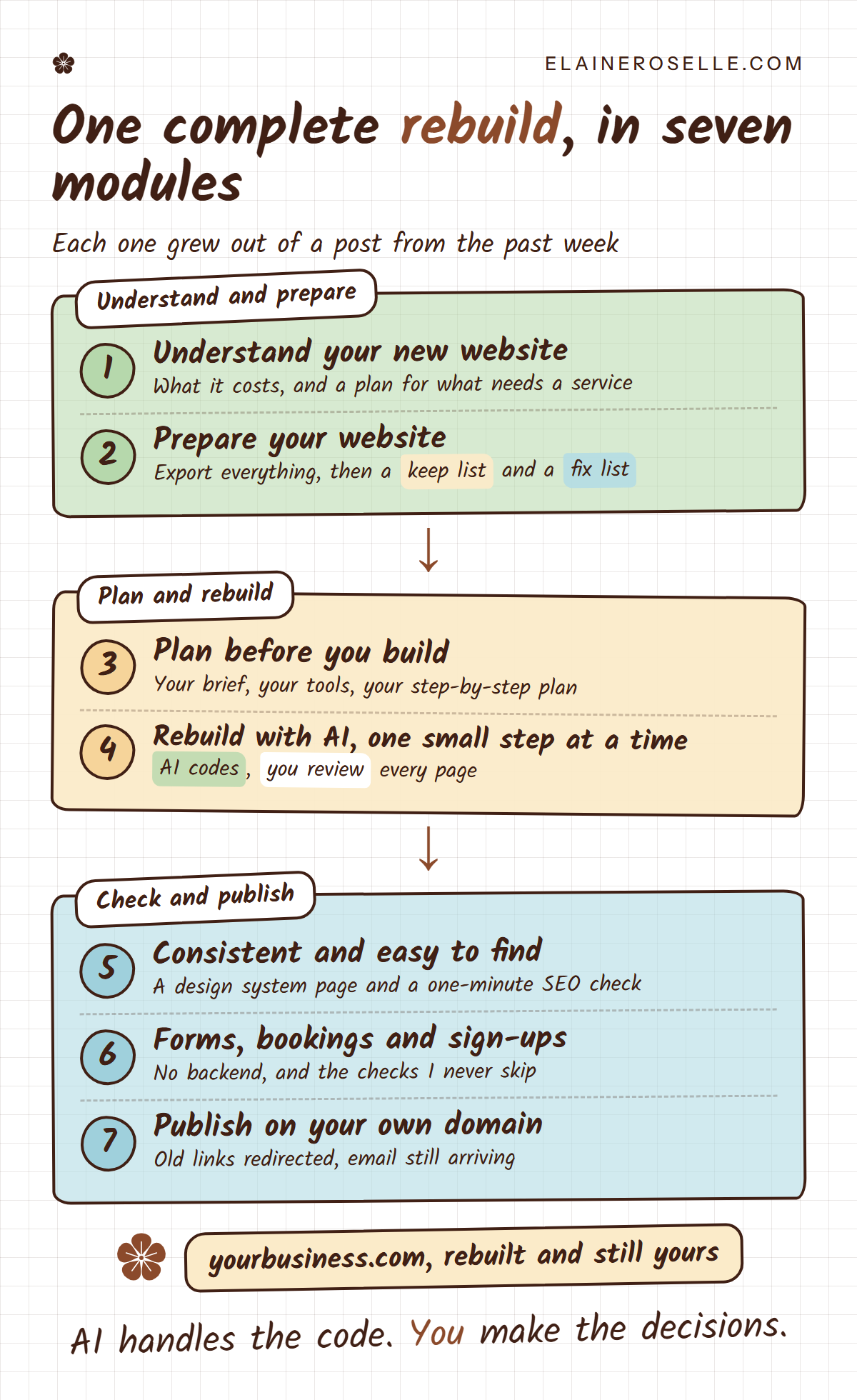
- Is a static website right for you? What it is, what it costs, where “free” has limits, and when it isn’t the right fit.
- Prepare your website. Audit what you have, export your content and images, save your old page addresses, and make your keep list and fix list.
- Plan before you build. Write your brief with my free Website Prompt Generator, set up Claude Code and GitHub, and make a step-by-step building plan.
- Rebuild with AI, one small step at a time. Give AI your brief and your real content, then review, refine and repeat.
- Make every page consistent and easy to find. A design system page, my one-minute SEO check, and what Google sees.
- Add forms, bookings and sign-ups. A contact form without building a backend, and the checks I never skip.
- Publish on your own domain. Cloudflare Pages, redirects for your old page addresses, your email kept safe, and your launch checks.
The posts show you what I did. The course shows you how, on screen, one step at a time, so you can do the same with your own site.
Plan one small thing, build it, check it, and only then move on.
Doors are open now, so you can start your rebuild today.
Who it’s for
This course is for you if:
- You already have a business website, and you’re unhappy with how it looks, how slow it is, or what it costs
- You want more control over your website, and fewer monthly fees for hosting, themes and plugins
- You’re curious about AI but don’t know how to use it to build something real
- You don’t know how to code, and you don’t want to learn traditional web development
- You like practical, step-by-step guidance you can follow at your own pace
Who it’s not for
I’d rather tell you now than have you find out halfway through:
- Large online stores, membership sites and heavily customised WordPress setups. This course is designed for relatively simple business websites.
- Anyone hoping for zero setup. “No coding required” doesn’t mean no technical steps. You’ll install a few tools, follow some instructions in the terminal, look after your project files and set up hosting. I show you every step, but you do need to be willing to try.
- Anyone who’d rather not do it themselves. That’s completely okay! I build websites for small businesses too, and I connect your domain for you.
What you’ll have at the end
A working website you understand, on a foundation that’s simple to look after, with your words, your brand and your domain. Your old links still land in the right place, and your hosting can cost nothing at all.
You don't have to throw your website away to fix it.
Most importantly, you’ll know how to keep improving it yourself: a new page, an updated price, a fresh photo, whenever you need one.
I like to think of my own website as a digital garden. I keep planting seeds: a new page here, a free resource there, a small feature I’ve been wanting to try. Yours can grow the same way.
Come and rebuild with me
If your website has been sitting on your to-do list, this is your invitation. I can’t wait to see what you rebuild.
And if you have questions, reply by email or get in touch. I’ll be answering them all week. Tomorrow, I’ll share honest answers to the questions you might have.
Still learning with you, little by little. 🤎
xo,
Elaine Roselle
This post was drafted with the help of AI from my planning notes and build history. It is carefully edited to fit my own voice.